What Is RSS?You may have been seeing those little orange RSS or XML buttons around the Internet. If you were wondering what they are...
It's "the next big thing" -- you can use it to get newsfeeds from CNN or BBC, as well as just about anything else, including news on upcoming movies, DVD releases, your favorite musician's tour updates, etc.
Once you get started, it's like having your favorite parts of the Web come to you. No need to go out and check for updates all the time.
"RSS" means "Really Simple Syndication." What it means to you is that when you subscribe to a site that has an RSS feed, you can keep up-to-date without having to check the site every day or week.
How do you get started? It's Easy!
There are two basic ways to subscribe to an RSS feed:
Subscribe through My Yahoo!, My MSN or Google Reader...

Add your-domain.com RSS to your "My Yahoo!"

Add your-domain.com RSS to your "My MSN"

Add your-domain.com RSS to your "Google Reader"
Or, you can download a free RSS Reader first. This is special software that reads the RSS feeds...
Windows -- RssReader
http://www.rssreader.com/
Mac -- NetNewsWire
http://ranchero.com/netnewswire/
Once you're set up, here's all you have to do...
Right-click (control-click for Mac users) on any orange RSS button on a site, blog or news source that interests you. Start by right-clicking on the orange button below. Then...
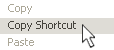 Select Copy Shortcut ("Copy Link to Clipboard" for Mac, "Copy Link Location" for Firefox browsers), and paste that URL into your RSS Reader. Select Copy Shortcut ("Copy Link to Clipboard" for Mac, "Copy Link Location" for Firefox browsers), and paste that URL into your RSS Reader.
And that's it! You're subscribed.

Right-click and get started.
Close Window | 


New information and links we believe you'll find helpful are being added continuously. Please add us to your bookmarks and check back here often. Right-click on the button below, and then click on "Bookmark this page."
New! Comments
Join our conversation! Leave me a comment about this page in the box below. If your comment is about another page on this site, please leave your comment on that page, because I have no ability to move it to the correct page. Thanks!For advice specific to your particular situation,
please consult a qualified professional legal or financial adviser. DO NOT Copy without permission. Thank you. Military-Money-Matters.com participates in the Amazon Services LLC Associates Program, an affiliate advertising program designed to provide a means for sites to earn advertising fees by advertising and linking to amazon.com, as well as other affiliate referral programs. If you purchase a product linked from this site, we may receive a small payment from the merchant. Doing so does not increase your price in any way, but these small amounts allow us to present the information here at no charge to you. Thank you for supporting our efforts by making your purchases using our links.